Skip to main content


|
Listen to Todays Featured Blog ????
Getting your Trinity Audio player ready...
|
Table of Contents
ToggleMaster Mobile-First Indexing: Boost Your Local Business SEO
Mobile SEO Best Practices for Local Businesses: Practical Tactics to Increase Mobile Visibility and Drive Conversions
Mobile SEO for local businesses means tuning your online presence for people who search on the go — and for Google’s mobile-first indexing. This guide shows how mobile-first indexing, responsive design, page speed, Google Business Profile (GBP) optimization, voice search, and structured data work together to turn mobile searches into foot traffic, phone calls, and bookings. You’ll get checklists, audit steps, and prioritized tactics built for small and medium local service providers so your effort maps directly to measurable results. We cover why mobile SEO matters in 2025, how to configure GBP for mobile users, responsive design basics, Core Web Vitals and speed fixes, voice-search readiness, and advanced strategies like schema and PWAs — all with actionable steps you can use right away.
Why Is Mobile SEO Critical for Local Businesses in 2025?
Mobile SEO matters because most local searches now happen on phones — and those searches often lead to immediate actions: calls, directions, or in-store visits. With mobile-first indexing, Google looks at your mobile site first, so content parity and speed directly affect visibility and conversions. Mobile searchers usually have strong transactional intent — many “near me” and service queries convert within hours — which makes mobile optimization one of the fastest ways to lift revenue. Below we unpack the latest trends and common conversion timelines so you can prioritize tactics that drive near-term results.
What Are the Latest Mobile Search Trends Impacting Local Businesses?
“Near me” and on-the-go queries keep growing, and voice-driven, conversational searches are changing how results are shown and clicked. Mobile SERPs now surface features like the local pack, People Also Ask (PAA), and direct action buttons (call, directions) more often, so businesses must favor concise answers and action-oriented markup. Searchers expect instant results: fast pages, clear answers, and easy contact actions — and that changes how listings and landing pages should be built. Knowing these trends explains why mobile-first optimization, local schema, and tight mobile copy are the smart investments for 2025.
Research into local optimization — especially Google Business Profile and structured data — shows clear gains in organic traffic and conversions for retailers.
Local SEO Optimization for Retailers: Google Business Profile and Structured Data Strategies
This study demonstrates the value of local optimization for retailers, explaining practical steps to improve placement in the Local Pack and increase organic traffic and conversion. Methods used include logical analysis and synthesis, plus tools such as Google My Business (to review profiles), a JSON‑LD generator (for structured markup), and Google’s Structured Data Testing Tool (to validate micromarking). The paper presents recommendations based on a retailer case example and shows how correct data markup helps outrank competitors in local results.
How Do Mobile Searches Influence Local Purchase Decisions?
Mobile local searches often show immediate intent — people look for a business, call, or get directions with plans to buy or visit soon. That immediacy makes page speed, prominent click-to-call, and accurate business attributes critical to micro-conversions like phone calls, bookings, and map clicks. Mobile UX friction (slow pages, tiny tap targets, buried CTAs) kills conversions quickly, so fixing those issues usually increases foot traffic and near-term revenue. The next section explains how to tune your Google Business Profile for mobile conversions.
How to Optimize Your Google Business Profile for Mobile Local SEO?
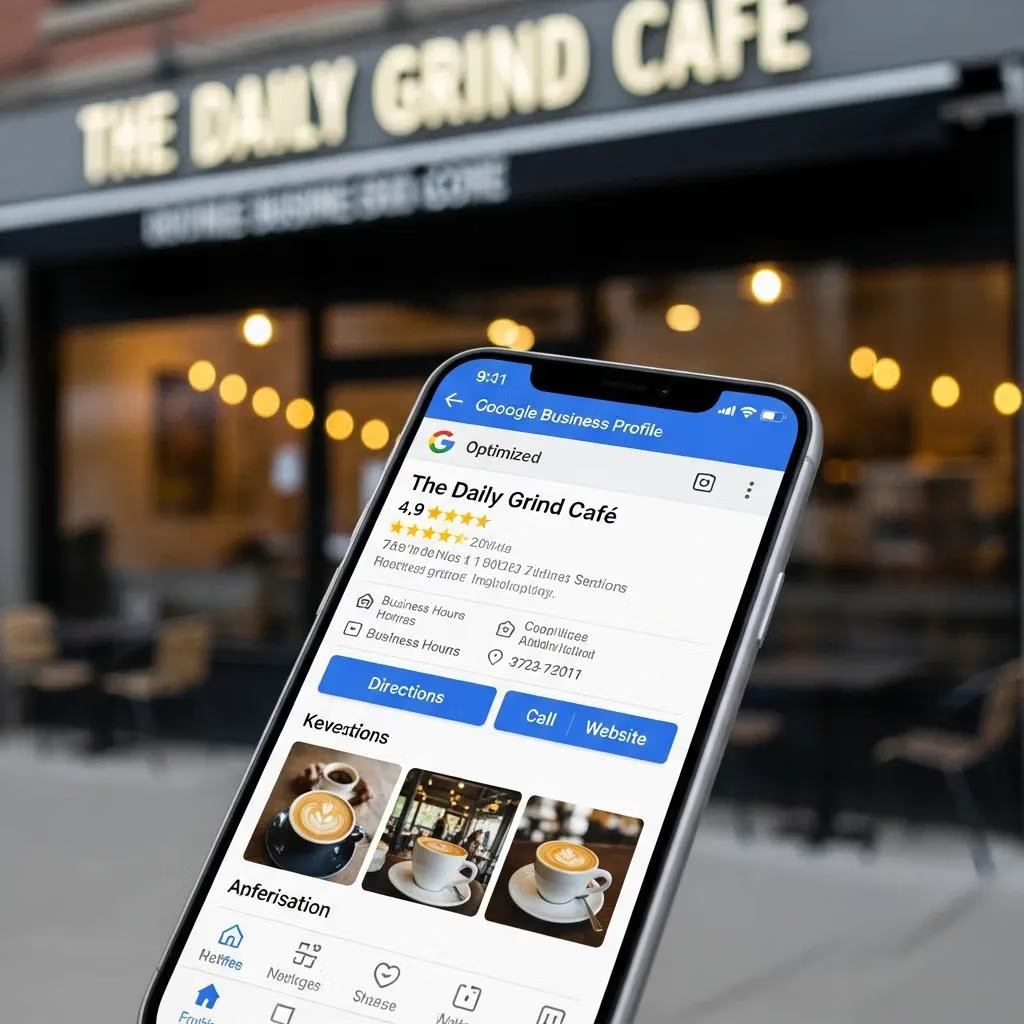
Optimizing your Google Business Profile for mobile is about clarity, quick actions, and trust signals that show up clearly on small screens. Make sure your NAP (name, address, phone) is complete, pick the right categories, add mobile-friendly photos, and fill in key attributes so your listing reads as authoritative. Reply quickly to reviews and keep Q&A updated — mobile users rely on quick social proof and answers. Below are the highest-impact GBP actions that typically lift mobile conversions the most.
The five most effective GBP actions for mobile visibility and engagement are:
- Complete core listing details: confirm your exact business name, correct category, and a clickable phone number so users can call immediately.
- Add mobile-optimized photos: use clear, high-contrast images that scale well and show your storefront, team, or services.
- Enable action buttons: make sure call, directions, and booking links appear and work smoothly on mobile.
- Publish short mobile posts and offers: keep promos concise and timely to show relevance in the moment.
- Monitor and respond to reviews and Q&A within 24 hours to build trust and increase click-to-call rates.
These steps form a practical checklist that boosts both ranking signals and on-the-spot conversion mechanics. The next subsection explains which GBP features matter most on mobile and how to format them for small screens.
What Are the Key Google Business Profile Features for Mobile Users?
On mobile, GBP elements that drive action are photos, primary action buttons, service lists, and short descriptions — all tuned for quick scanning and easy taps. For photos, pick images that show the service context and keep file sizes low for faster loads. Service lists should use short titles and show price or appointment cues when possible to increase bookings. The table below matches GBP sections to recommended mobile attributes so you can prioritize fixes that move the needle fastest.
| GBP Section | Recommended Mobile Attribute | Mobile Display Tip |
|---|---|---|
| Photos | High contrast, 4:3 or 16:9 crops | Choose images that show service context and scale cleanly on small screens |
| Action Buttons | Call, Directions, Book | Make the phone number clickable and ensure booking links are mobile-friendly |
| Posts & Offers | Short text + clear CTA | Keep copy under 100 characters and refresh weekly to stay relevant |
| Services | Short titles, pricing when possible | Feature top services in the primary view for quick decision-making |
This comparison helps you decide what to fix first on GBP for the quickest conversion gains. Next, we cover review and Q&A management tactics that keep mobile visitors engaged and confident.
How Can You Manage Reviews and Q&A to Improve Mobile Engagement?
Active review and Q&A management strengthens mobile trust signals and raises click-to-call and visit rates. Set a response SLA (aim for 24 hours), use short courteous replies that suggest a next step (call, link, or appointment), and proactively seed common questions with answers about bookings, pricing, and accessibility. Use notifications or a simple team workflow so staff see new reviews and questions quickly — fast replies move more mobile searchers into action.
What Are the Best Responsive Design Practices for Local Mobile SEO?
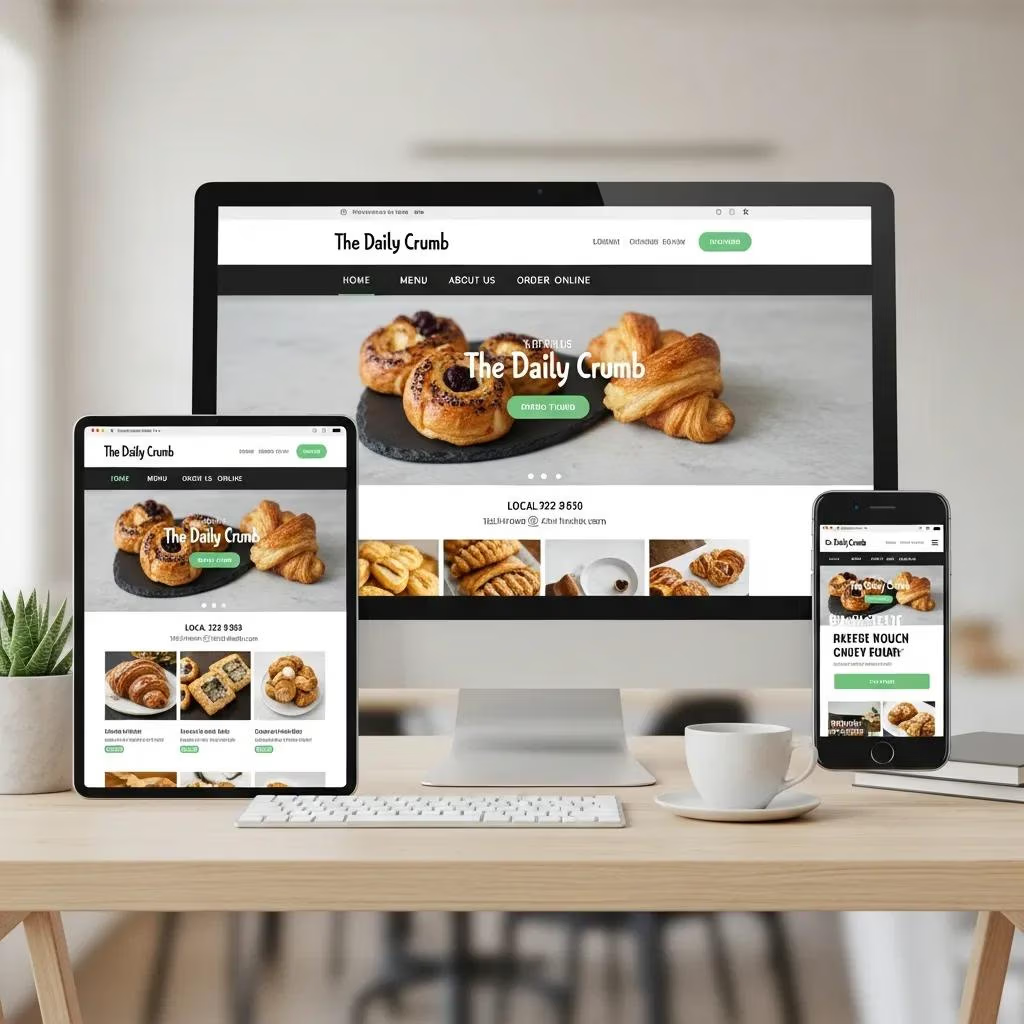
Responsive design keeps the same content and structured data available across devices while adapting layout and controls to each screen size — a must for mobile-first indexing and consistent local ranking signals. Use fluid grids, flexible media, and CSS media queries so pages render fast and keep content parity with desktop. For local sites, prioritize visible contact actions, readable CTAs, and simple navigation so users ready to call or visit don’t hit friction. The following sections explain how responsive design improves UX and search performance, then list the essential mobile-site elements to validate during an audit.
How Does Responsive Design Enhance User Experience on Mobile Devices?
Responsive design improves usability by adapting layout and content flow to small screens, which reduces bounce and improves engagement metrics that affect rankings. A single responsive codebase simplifies crawling and prevents content mismatches that hurt mobile-first indexing. Design choices like larger tap targets, readable font sizes, and prominent contact elements directly increase mobile conversions. Next we list the essential mobile-friendly elements every local business site should include.
What Are the Essential Elements of a Mobile-Friendly Local Business Website?
A mobile-friendly local site should present clear contact details, click-to-call CTAs, simple navigation, and local landing pages targeted to specific service queries. Add an above-the-fold contact block with phone and directions, use readable fonts and spacing, and keep forms short to minimize abandonment. Embed maps or direction links that open in map apps, and include LocalBusiness schema on landing pages to support SERP enhancements. The checklist below highlights high-priority elements to validate during an audit and quick tests for mobile readiness.
- Clickable phone and directions: put call and map links on every key page for immediate action.
- Simple forms: limit fields to name, phone, and preferred times to reduce drop-off.
- Readable content: choose legible fonts and spacing so users can scan fast.
- Local landing pages: build short, intent-focused pages for high-value local keywords.
These elements remove friction for mobile searchers and raise engagement and conversion rates. Next we define Core Web Vitals and list fixes that improve mobile rankings and UX.
How Can You Improve Mobile Page Speed to Boost Local Search Rankings?
Speed work focuses on Core Web Vitals, asset optimization, and removing render-blocking resources so pages load fast and respond quickly to input — which helps both rankings and conversions. Core Web Vitals measure loading, interactivity, and visual stability: Largest Contentful Paint (LCP), Interaction to Next Paint (INP), and Cumulative Layout Shift (CLS). Hitting mobile thresholds improves perceived quality for users on the move. Local businesses can take quick wins like image compression and caching, then plan longer-term moves like critical CSS inlining and server improvements. The table below links each metric to target values and common fixes that are practical for local sites.
| Metric | Target Value (Mobile) | Common Optimization Technique |
|---|---|---|
| LCP (Largest Contentful Paint) | ≤ 2.5s | Optimize hero images, improve server response, use critical CSS |
| INP (Interaction to Next Paint) | Low latency (fast) | Reduce main‑thread work, defer non‑critical JavaScript |
| CLS (Cumulative Layout Shift) | < 0.1 | Reserve image/video space, avoid injecting dynamic content without placeholders |
Knowing these targets helps you prioritize technical fixes that improve both user experience and ranking potential. The next subsection lists prioritized techniques and tools suited for local business sites with short implementation notes.
What Are Core Web Vitals and Their Impact on Mobile SEO?
Core Web Vitals measure real user experience on loading, interactivity, and visual stability — all of which correlate with satisfaction and conversion on mobile. LCP tracks how fast the largest visible element appears, INP measures responsiveness to user input, and CLS captures unexpected layout shifts that cause mis-taps. Poor Core Web Vitals lower engagement and can reduce local ranking opportunities, so improving them should be part of any local site’s SEO and UX plan. The following section shows practical, efficient techniques for small sites.
Case studies show that improving Core Web Vitals can produce measurable uplifts in conversion rates for e-commerce and service sites.
Web Performance Optimization for Conversion Rate Gains: A Case Study
This paper describes how web performance optimization (WPO) improved conversion and bounce rates for two types of opinion forms on a major Polish portal. Using tools like WebPageTest and analytics, the study applied modern WPO techniques and tracked results before and after optimizations. For the company opinion form, conversion rose from 6.35% to 14.30% over six months; the product form showed a different pattern, highlighting how performance changes can affect different experiences in varied ways.
Which Techniques Optimize Mobile Page Speed for Local Businesses?
Start with fast wins: compress and serve responsive images (use WebP where supported), enable browser caching, and remove or defer third-party scripts that block rendering. Add lazy loading for below‑the‑fold media, minify and combine CSS/JS, and consider a CDN or better hosting to lower TTFB. If you want expert help, Core Web Vitals audits, image optimization packages, and PWA builds are common services. Local Digital Buzz provides audit-based recommendations and prioritized remediation plans if you prefer a hands‑on review.
Performance tooling and Core Web Vitals best practices are widely documented to improve user experience and business metrics like conversion.
Web Performance Tooling and Core Web Vitals: Enhancing User Experience and Business Metrics
This research highlights why optimizing web performance is essential: slow sites lose users — studies show over half of users leave pages that take more than three seconds to load. Tools like Lighthouse, PageSpeed Insights, and WebPageTest help measure metrics such as LCP and FID/INP and guide optimizations that reduce bounce and lift conversions. The paper reviews tooling, common strategies, and the measurable impact of small improvements on user behavior.
This prioritized approach balances quick wins with strategic investments so local sites improve both perceived speed and measurable Core Web Vitals scores. Next, we cover voice search tactics that complement mobile intent signals.
How to Master Voice Search SEO for Local Businesses?
Voice search optimization focuses on conversational, question-based content and short, direct answers that match how people speak to assistants. Voice queries are often longer and more natural than typed searches, so structure content around natural language and micro‑moment intent. Use FAQ schema, concise answer blocks, and strong local signals (GBP and consistent citations) so assistants can pull authoritative responses. The subsections below outline best practices and explain how voice behavior affects mobile local rankings.
What Are the Best Practices for Optimizing Voice Search Queries?
Map conversational queries and build short Q&A content that answers what, where, when, and how in plain language. Mark up those Q&A pairs with FAQ schema so search engines and voice assistants can extract clear answers for spoken responses. Prioritize local phrases with natural modifiers like “near me now,” “open,” or “book appointment,” and keep GBP and citations consistent to boost trust. These steps raise the chance your content becomes the voice response or a concise mobile snippet.
How Does Voice Search Affect Local Mobile SEO Rankings?
Voice search increases the value of concise, authoritative answers and rewards content that’s structured with clear markup. Voice results often pull from featured snippets and GBP entries, so optimizing both on-page Q&A and listing attributes helps capture more voice-driven calls and visits. Voice traffic usually has high local intent, so voice-readiness helps both mobile visibility and immediate conversions. The next section covers advanced mobile strategies — schema, PWAs, and content parity — that amplify these gains.
What Advanced Mobile SEO Strategies Drive Local Business Growth?
Advanced strategies include ensuring mobile-first content parity, using local schema markup to trigger richer mobile SERP features, and adopting Progressive Web Apps (PWAs) where they make sense to boost speed and engagement. Mobile-first indexing means the mobile version of your site must include the same content, structured data, and internal links as desktop or rankings can suffer. Local schema types like LocalBusiness, FAQ, and HowTo can create additional mobile real estate and increase CTR. Below is a simple benefit vs. effort comparison to help you prioritize advanced investments.
| Advanced Feature | Benefit | Implementation Complexity |
|---|---|---|
| PWA (Progressive Web App) | Improved speed, offline access, better engagement | Medium–High |
| LocalBusiness Schema | Enhanced mobile SERP features and clarity | Low–Medium |
| FAQ & HowTo Schema | Higher chance of featured snippets and voice answers | Low |
| Mobile-first Content Parity | Stable rankings under mobile-first indexing | Low–Medium |
How Does Mobile-First Indexing Affect Local SEO and Content Parity?
Mobile-first indexing means Google primarily uses the mobile version of your pages to index and rank. If important content or resources are missing from the mobile site — or JS/CSS is blocked — your visibility can suffer. Make sure mobile pages include the same text, structured data, images, and internal links as desktop. Use Search Console and mobile render tools to spot parity problems like hidden content behind tabs or blocked assets, and follow the advice in mobile content strategies to fix them.
How Can Local Schema Markup Enhance Mobile SERP Visibility?
LocalBusiness, FAQ, and Service schema give search engines structured signals that can create richer mobile features like knowledge panels, quick actions, and snippet answers. Include core attributes — name, phone, address (if relevant), openingHours, service types, and concise FAQ entries — and validate markup with schema testing tools. When structured data triggers rich features, mobile CTR tends to rise, so apply schema consistently across your local landing pages to increase the chance of enhanced display.
What Mobile Content Strategies Engage On-the-Go Local Users?
Make mobile content scannable, intent-focused, and built for micro-moments — those quick interactions where people need an immediate answer or action. Use short landing pages for specific local queries, clear CTAs for calls or bookings, and microcopy that removes hesitation (for example, “Call now for same-day service”). Use localized headlines and appropriate schema to tie content to nearby intent and add FAQ sections that work for voice and featured snippets. These tactics match mobile user intent to fast, action-oriented experiences that convert.
If you’d rather have hands-on help, Local Digital Buzz offers targeted mobile SEO services: responsive design tuned for mobile-first indexing, GBP optimization and Q&A/review management, Core Web Vitals audits, and PWA builds — all delivered as prioritized action plans. For example, a local service provider that implemented prioritized speed fixes and GBP tuning saw measurable increases in calls and direction clicks within weeks. For a complimentary mobile SEO audit and a prioritized remediation roadmap, contact Local Digital Buzz for a focused assessment tailored to your business.
| Advanced Strategy | Benefit | Implementation Timeframe |
|---|---|---|
| Core Web Vitals Audit | Identify high-impact speed fixes | 1–2 weeks |
| GBP Optimization & Q&A Management | Faster local action and trust | Ongoing |
| PWA Conversion Build | Improved repeat engagement | 4–8 weeks |
This final table makes time-to-value clear so you can plan phased work that aligns with revenue goals.
Frequently Asked Questions
What role does local SEO play in mobile search optimization?
Local SEO is central to mobile search because it helps businesses appear for location-based queries. Mobile users often search “near me” when they need something now, so optimizing local keywords, keeping your Google Business Profile accurate, and applying local schema increases visibility and drives immediate actions like calls and visits.
How can businesses measure the effectiveness of their mobile SEO efforts?
Measure mobile SEO with organic mobile traffic, conversion rates, and engagement metrics like bounce rate and time on site. Use Google Analytics and Search Console for detailed insights, and track mobile-specific KPIs such as click-to-call rates and map directions. Regular audits and performance reviews help validate progress and spot new opportunities.
What are the common mistakes to avoid in mobile SEO?
Common mistakes include ignoring mobile speed, not using responsive design, and failing to optimize for local intent. Avoid non‑mobile formats (like legacy Flash), neglecting structured data, and leaving GBP or reviews unmaintained. These missteps reduce visibility and create friction for mobile visitors.
How does voice search impact content creation for local businesses?
Voice search pushes content toward conversational, question-and-answer formats. Create concise answers to common queries and use FAQ schema so voice assistants can surface your content. Optimize for natural language and local phrases to improve your chances of appearing in voice responses and featured snippets.
What are the benefits of using Progressive Web Apps (PWAs) for local businesses?
PWAs offer faster load times, offline access, and a native-like experience that improves engagement and retention. They support push notifications to re-engage customers and often lift conversions by making repeat visits smoother. For many local businesses, a PWA is a high-value investment in mobile experience.
How can local businesses stay updated with mobile SEO trends?
Stay current by following industry blogs, attending webinars, and joining SEO communities. Subscribe to newsletters from trusted sources like Moz, Search Engine Journal, and Google’s own webmaster channels. Regularly review Google updates and run periodic audits to keep your strategy aligned with evolving best practices.
Conclusion
Mobile SEO is no longer optional for local businesses — it’s how you turn mobile searches into real customers. Focus on a complete and mobile-friendly Google Business Profile, fast page speed, and concise, voice-ready content to capture urgent local intent. These practical steps will improve visibility and produce measurable conversions. If you want tailored help, our team is ready to run a focused audit and deliver a prioritized roadmap to lift your mobile performance.
**