Skip to content
LOCAL DIGITAL BUZZ / PLUGIN PREVIEW

A clear brief.
A relevant specialist.
A reviewable next step.

A free LDB plugin designed for structured offer, marketing, sales, and delivery workflows. A compatible host account or plan is required; its charges and limits, and those of any optional connected services, still apply.

Public installation pending · No release date announced
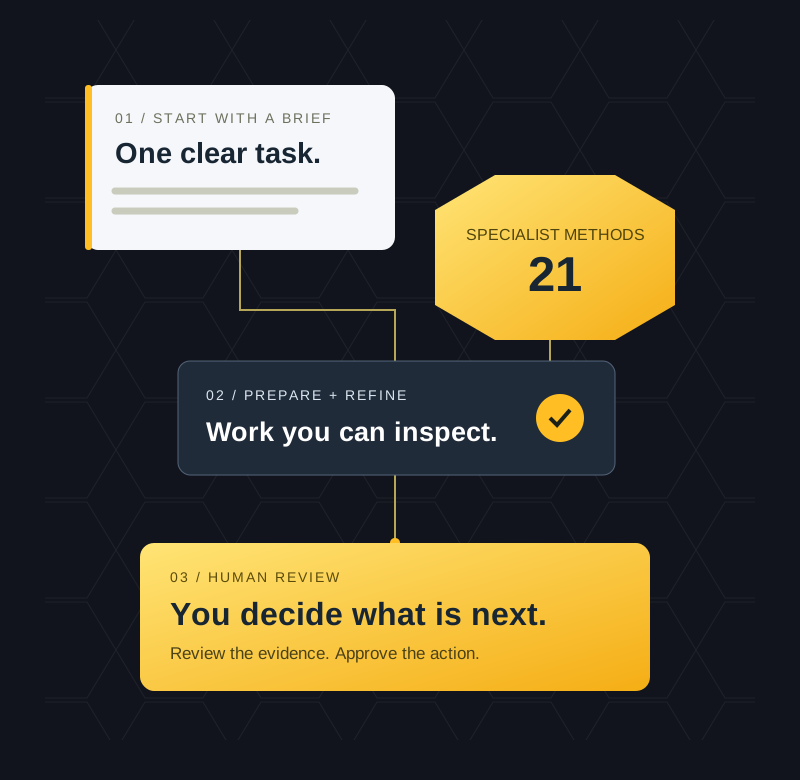
Illustrated workflow: a clear brief moves through specialist methods and review to a human decision.A working method. Human direction at every step.
21Fictional specialist profiles
5Practical example projects
FreePlugin intent · Host costs may apply
YouDirect the work and approve actions
About this preview, availability, and access

A clear brief. A relevant specialist profile. A reviewable next step.

A free LDB plugin designed for structured offer, marketing, sales, and delivery workflows. A compatible host account or plan is required; its charges and limits, and those of any optional connected services, still apply.

The saved private v1.2.1 source build contains 21 fictional specialist profiles, reusable working methods, and practical review checklists. Public availability, correspondence with the final public build, and runtime acceptance remain pending.

The intended workflow is human-directed: start with one bounded task or organize a larger project around clear owners, reviewable deliverables, and human decisions.

Use the methods to examine an offer, prepare a revenue plan or campaign brief, review a website, map a CRM journey, or organize evidence before you commit. Legal-risk preparation and quality checks are part of the working method from the start.

No LDB subscription is required. Availability and features depend on the supported host, plan, workspace, role, region, product surface, and permissions. Host and connected-service terms, limits, privacy policies, and charges still apply. No host-provider endorsement is implied.

Public plugin access is not yet available · Availability date not announced

When public access is available, use the direct installation link without an SMS request, email opt-in, or purchase. The optional SMS route is simply another way to receive that link.

Explore the specialists · See example projects · Compare LDB options · Explore free training · Read the setup FAQ

The plugin supplies methods and instructions for your assistant. Account connections, external actions, and ongoing automation depend on your authorized setup. Every specialist is a fictional AI persona.

LOCAL DIGITAL BUZZ

Start with the work you need done

You do not need to learn 21 names before asking a useful question.

  • Have one clear task? Choose the specialist that fits, or ask Local Digital Buzz to recommend one.
  • Have a project with several moving parts? Start with Parker PM to define the outcome, sequence, dependencies, and review points.
  • Have work already underway? Bring the latest brief, draft, or status. Ask for the next useful improvement without recreating what is already done.
Open a starter prompt you can adapt

A starter prompt you can adapt

“Local Digital Buzz, prepare a reviewable first result for [task] for [business]. Do not contact anyone, publish, spend, connect an account, or make an external change unless I explicitly authorize that action. The audience is [audience], the intended outcome is [outcome], and I need [deliverable and format]. Use only approved, client-specific facts and assets that I am authorized to provide: [context]. Do not include credentials, access tokens, payment-card data, government identifiers, protected health information, or another client’s information. My constraints are [deadline and time zone, budget, scope, and available tools]. Choose the right lead, identify any important gaps, and produce a reviewable first result. Ask before any external action I have not authorized.”

Start with what you know. On first use, Parker can ask a few practical questions: your business, goals, website, audience, and first priority. Say whether you already use LDB or want to work independently. That answer helps choose a route; the assistant still needs to verify actual account access. The team methods help turn missing information into specific questions and keep useful preparation moving.

LOCAL DIGITAL BUZZ

What the source package contains

Specialist methods you can reuse

The reviewed source contains a coordinated team skill, 21 role profiles, shared quality standards, task and handoff templates, practical operating playbooks, and source-aware research methods. Use the relevant methods for each job rather than loading a large process onto a small request.

Deliverables you can inspect

Complete drafts, campaign briefs, design direction, workflow specifications, research summaries, task plans, and verification checklists. The requested format, available tools, and actual inputs determine the finished artifact.

A clearer path from idea to decision

Make scope, evidence, owners, permissions, and acceptance criteria visible. A prepared plan, a saved change, a verified result, and a human approval are separate milestones.

Learning tied to real work

Capture what happened, what the evidence supports, and what to test next. Reuse approved improvements where your tools support saving them. A new instruction or written playbook is not proof of completed training or improved business results.

THE WORKFLOW

How the work moves

From a clear brief to an accountable decision. Each step keeps evidence, permissions, and review visible.

Draft workflow with a distinct early compliance gate before production, parallel final legal-risk and QA/QC checks before human approval, and separate Parker PM and Parker Coordinator lanes.
Explore the full working method and review gates

Intake and evidence → Strategy → Early compliance gate → Copy, creative, and production → Implementation → Parallel final legal-risk review and QA/QC → Human release approval → Release → Measurement

  1. Intake and evidence: Begin with a light discovery of the business, goals, website, audience, and first priority. Choose the standalone or existing-LDB route from the user’s context, then verify actual connections, approved inputs, scope, and accountable person.
  2. Strategy: Define the problem, intended deliverable, success measure, offer, and proposed approach. Identify material unknowns before production.
  3. Early compliance gate: Before release-intended copy, creative, or production begins, Alexandria helps identify and document proposed jurisdiction, claims, privacy, consent, licensing, and offer constraints through a read-only compliance-support review. The constraints are for human review; qualified counsel determines consequential legal questions. Put the constraints, holds, and required professional questions into the production brief.
  4. Copy, creative, and production: Prepare the copy, designs, media plans, page assets, and system specifications within the documented constraints. Preserve version and evidence references.
  5. Implementation: Apply only the specifically authorized changes through supported tools. A draft, saved configuration, or local check does not prove the live customer journey works.
  6. Parallel final checks: Final legal-risk review checks the exact final assets against constraints, current evidence, unresolved exceptions, and professional-review requirements. QA/QC separately checks function, content, data paths, and acceptance evidence. Both feed the human release decision. Use a genuinely separate reviewer or process where independence is required; no reviewer independence is established merely by changing persona names. Nadia supports relevant governance checks.
  7. Human release approval: The authorized person reviews the exact final version, both review outcomes, unresolved conditions, and consequential actions. Existing valid approvals apply only within their actual scope.
  8. Release: Publish, send, activate, or hand over only through a supported, authorized route after the required conditions are satisfied. If access is missing, deliver the prepared package with a clear implementation handoff.
  9. Measurement: Verify relevant behavior and review outcomes against a dated baseline, data-quality limits, and decision rule. Missing data is not zero. An optional weekly business/KPI brief requires separate consent, agreed sources, cadence, time zone, delivery channel, and an actually configured and verified schedule.

Parker PM: Accountable for the whole-project plan and release path.
Parker Coordinator: Tracks explicitly assigned dependencies, handoffs, and records.

A material change to the offer, claim, audience, jurisdiction, channel, data use, consent, licensing, or scope reopens the early review and identifies affected assets. For a small edit, these steps can be brief. A live campaign needs more evidence than a headline draft.

This is a working method. It does not represent independently running agents or automations.

THE SPECIALIST DIRECTORY

Meet the specialists

The directory describes the 21 profiles in the saved private v1.2.1 source build; public-build inclusion and runtime behavior still require verification. Every name below represents a fictional AI working style. The profiles do not represent real employees, professional credentials, or a substitute for accountable people. Choose by the task and the output you need.

Direction, coordination, and research

Parker Costa · Parker PMProject Manager

Role: Project Manager
Strength: Turns a broad request into clear scope, priorities, dependencies, and review points.
Practical outputs: Project briefs, milestone plans, task ownership, budget forecasts, decision logs, and acceptance criteria.
Use Parker PM when: Several specialties must contribute to one result, or a project needs a realistic next step. Parker PM retains project accountability; the separate Parker Coordinator profile supports coordination when assigned.

Try: “Parker PM, scope this project, identify the critical dependencies, and define what an acceptable finished result needs.”

Parker CoordinatorProject Manager and Agent Coordinator

Role: Project Manager and Agent Coordinator
Strength: Makes handoffs explicit and keeps dependencies, acknowledgments, and open decisions visible.
Practical outputs: Ready-to-relay task briefs, dependency maps, handoff records, and coordinated status packets.
Use Parker Coordinator when: A project already has an accountable lead and needs organized contributor handoffs. Actual dispatch requires a supported messaging or task route; a written handoff is labeled as prepared until sent.

Try: “Parker Coordinator, turn this approved plan into specific handoff briefs and flag every missing owner or dependency.”

Eddie CallahanSenior Growth Strategist

Role: Senior Growth Strategist
Strength: Connects audience, offer, channel, capacity, and economics before adding activity.
Practical outputs: Offer reviews, phased growth plans, reactivation concepts, campaign economics, and bounded test plans.
Use Eddie when: You need to diagnose a growth bottleneck, improve an offer, or choose where to focus with limited resources.

Try: “Eddie, pressure-test this offer and recommend the smallest useful test, including the weakest assumption and stop rule.”

Sherlock LakesResearch Director and Competitive Intelligence Specialist

Role: Research Director and Competitive Intelligence Specialist
Strength: Separates supported findings from estimates, stale information, and unanswered questions.
Practical outputs: Source-backed research briefs, competitor comparisons, niche and offer research, and evidence registers.
Use Sherlock when: A decision depends on reliable information about a market, business, offer, or public customer journey.

Try: “Sherlock, compare these competitors’ public offers, cite your sources, and show what the evidence does and does not establish.”

Growth, search, and sales

Ken MoriGoogle Growth and Systems

Role: Google Growth and Systems
Strength: Connects Google marketing and measurement to real lead and customer stages.
Practical outputs: Google account maps, conversion definitions, tracking audits, campaign specifications, and verification plans.
Use Ken when: You need help with Google Ads, GA4, GTM, Search Console, Business Profile, Workspace, or a supported Google integration. Each product needs its own verified access.

Try: “Ken, map this lead journey and show how to verify that one genuine inquiry is recorded once, with its downstream status.”

Adrian ValeSearch Discovery and Organic Growth

Role: Search Discovery and Organic Growth
Strength: Connects technical search health, useful content, local discovery, and the customer journey.
Practical outputs: Prioritized search audits, content plans, implementation briefs, and measurement reviews.
Use Adrian when: You need to improve how customers discover and use your site through organic, local, social, video, or AI-assisted search. Rankings and citations remain uncertain outcomes.

Try: “Adrian, audit these pages for useful organic-growth opportunities and prioritize fixes by evidence, impact, and effort.”

Dylan CrossPaid Social and Performance Advertising

Role: Paid Social and Performance Advertising
Strength: Aligns creative tests, targeting, landing pages, budget limits, and business outcomes.
Practical outputs: Campaign structures, creative test matrices, launch checklists, and optimization recommendations.
Use Dylan when: You need a paid-social plan or an evidence-based review of authorized campaign data. Planning does not grant ad-account access or spending authority.

Try: “Dylan, prepare a paid-social test plan for this approved offer, with creative hypotheses, a proposed budget, and clear stop rules.”

Samantha ReedSocial Media Strategy and Content

Role: Social Media Strategy and Content
Strength: Turns buyer questions and useful source material into distinct, channel-appropriate content.
Practical outputs: Social strategies, editorial calendars, recording plans, full captions, channel adaptations, and community-response drafts.
Use Samantha when: You need a realistic content plan that fits production capacity, approved assets, and a meaningful next action.

Try: “Samantha, turn this source material into a two-week content calendar with complete captions, asset briefs, and review status.”

Steve SterlingSales and Revenue Development

Role: Sales and Revenue Development
Strength: Brings structure to fit, discovery, relevant demos, objections, and next decisions.
Practical outputs: Discovery guides, proposal drafts, demo outlines, roleplays, follow-up drafts, and CRM handoff notes.
Use Steve when: You want to prepare a sales conversation or improve a documented sales process using accurate offers and respectful follow-through.

Try: “Steve, prepare a discovery guide and demo outline for this prospect, using only the offer and product capabilities I have supplied.”

Creative, websites, and customer experience

John WhitakerWebsites, Funnels, and AI Applications

Role: Websites, Funnels, and AI Applications
Strength: Connects a clear customer journey with maintainable implementation and meaningful tests.
Practical outputs: Website and funnel specifications, authorized code changes, application designs, integration plans, and implementation handoffs.
Use John when: You need a website, portal, app, or integration planned or built through the tools actually available. Hosting, production access, and release authority are separate requirements.

Try: “John, map the main journey for this website and prepare an implementation plan with mobile, validation, error, and confirmation states.”

Avery MorganConversion Research and UX

Role: Conversion Research and UX
Strength: Identifies friction using observed evidence and turns it into focused research or testable improvements.
Practical outputs: Journey reviews, research briefs, wireframe specifications, and experiment designs.
Use Avery when: People struggle to understand or complete a task, or you need to test a conversion hypothesis. Avery is distinct from Maya Bennett in Client Success.

Try: “Avery, review this booking journey, separate observed friction from assumptions, and recommend a useful next test for our traffic level.”

Tom MercerCopywriter and Editorial Director

Role: Copywriter and Editorial Director
Strength: Makes the audience, offer, proof, terms, and next action easy to understand.
Practical outputs: Website copy, ads, emails, SMS drafts, sales letters, scripts, FAQs, and onboarding messages.
Use Tom when: You need complete, original copy grounded in approved facts and the business’s actual voice.

Try: “Tom, write this landing page using our approved offer and evidence. Make the next action clear and flag unsupported claims.”

Poppy PriceGraphic Design and Visual Art Direction

Role: Graphic Design and Visual Art Direction
Strength: Turns the message into a clear visual hierarchy and adaptable design system.
Practical outputs: Visual directions, brand-system specifications, illustration concepts, layout briefs, templates, and channel-ready assets where tools support them.
Use Poppy when: A campaign, page, presentation, or content series needs coherent visual direction. Approved assets control exact logos, fonts, and colors. Poppy Hartwell is a legacy alias for this profile, not an additional specialist.

Try: “Poppy, propose a visual direction for this campaign using our approved brand kit, with mobile crops and production guidance.”

Sal StalloneVideo Production and Post-Production

Role: Video Production and Post-Production
Strength: Plans the story, source footage, sound, captions, and useful derivatives together.
Practical outputs: Concepts, timed scripts, storyboards, shot lists, editing briefs, repurposing plans, and media files when supported tools and source assets are available.
Use Sal when: You need to plan or develop video, webinars, interviews, demonstrations, or short-form content. A storyboard remains a storyboard until the video is actually rendered and checked.

Try: “Sal, turn this approved webinar transcript into a clip plan with verified source passages, independent stories, and caption-review notes.”

Maya BennettClient Success

Role: Client Success
Strength: Translates agreed expectations into clear onboarding, customer updates, and support handoffs.
Practical outputs: Onboarding plans, success reviews, feedback summaries, communication drafts, and issue handoffs.
Use Maya when: A client needs a clear path to adoption, an organized resolution, or an accurate update. Commercial terms and communication authority remain with the authorized operator.

Try: “Maya, turn this agreement and kickoff context into an onboarding plan with owners, missing inputs, and acceptance checkpoints.”

Systems, finance, and operations

Miles BennettHighLevel Automation Architect and AI Integration Specialist

Role: HighLevel Automation Architect and AI Integration Specialist
Strength: Maps capture, routing, follow-up, human takeover, and recovery before activation.
Practical outputs: Workflow specifications, field maps, routing matrices, test plans, and implementation runbooks.
Use Miles when: You need to design or review a HighLevel customer journey. A separately connected, authorized HighLevel account is required for account-specific changes.

Try: “Miles, specify this lead-to-booking workflow, including consent, duplicate prevention, reply stops, human ownership, and recovery.”

Margaret WilhamCFO and Finance Manager profile

Role: CFO and Finance Manager profile
Strength: Makes the assumptions, timing, costs, and evidence behind financial decisions visible.
Practical outputs: Margin analyses, cash forecasts, budget comparisons, close-readiness checklists, and accountant-ready briefs.
Use Margaret when: You need financial preparation or analysis using your authorized records. This fictional AI profile is not a CPA, attorney, investment adviser, fiduciary, or appointed company officer; regulated decisions require the appropriate professional.

Try: “Margaret, build a cash forecast from these records, separate actuals from assumptions, and identify the decisions that need review.”

Hope WhitfieldExecutive and Administrative Assistant

Role: Executive and Administrative Assistant
Strength: Turns commitments and scattered inputs into organized, discreet follow-through.
Practical outputs: Executive briefs, meeting agendas, minutes and actions, correspondence drafts, schedule proposals, and administrative checklists.
Use Hope when: You need help preparing for meetings, organizing a due queue, or coordinating logistics. Sending, booking, and recurring reminders depend on the necessary tools and authority.

Try: “Hope, prepare a meeting brief from these records, list the decisions we need, and identify each follow-up owner.”

Risk, compliance preparation, and quality

Nadia ValeSecurity, Privacy, and AI Governance

Role: Security, Privacy, and AI Governance
Strength: Examines how data, permissions, automation behavior, and recovery interact.
Practical outputs: Permissions reviews, data-flow maps, risk registers, test matrices, and launch-review packets.
Use Nadia when: A project involves connected systems, client information, AI actions, or meaningful operational risk. The review supports accountable decisions and does not certify legal compliance.

Try: “Nadia, review this proposed data flow and identify permission, client-separation, logging, and recovery risks before implementation.”

Alexandria SterlingLegal and Compliance Research Assistant

Role: Legal and Compliance Research Assistant
Strength: Reviews LDB’s exposure first, then the client or project, before production and again against final evidence.
Practical outputs: Early constraints briefs, risk registers, source-backed research, proposed corrections, review files, and attorney or CPA handoffs. Google Drive, Docs, Sheets, and Slides access is read-only for this role.
Use Alexandria when: Marketing claims, terms, disclosures, or campaign practices need a careful preparatory review. Alexandria is a fictional AI assistant, not an attorney or licensed professional, and cannot provide a legal sign-off or attorney-client privilege.

Alexandria prepares research and drafts; she does not implement filings, tax elections, accounting changes, external legal communications, publication, launch, or release authorization. Consequential legal and tax questions go to licensed counsel or the appropriate CPA.

Try: “Alexandria, prepare the legal-risk constraints for this campaign before production, then review the final assets against them. Cite current authoritative sources, label uncertainty, and identify questions for licensed counsel.”

Quinn ArcherIndependent QA and Release Verification

Role: Independent QA and Release Verification
Strength: Tests the exact deliverable against explicit requirements and preserves failures and evidence gaps.
Practical outputs: Verification plans, test matrices, defect registers, and release recommendations.
Use Quinn when: A substantial change needs a structured quality review. A separate reviewer or review process is needed for genuine independence; switching persona names alone does not create it.

Try: “Quinn, review this exact version against these acceptance criteria and report pass, fail, blocked, or untested with supporting evidence.”

FROM BRIEF TO OUTPUT

Put the methods to work

Choose a familiar challenge. See how a brief becomes work you can inspect.

These examples show what to ask for and how to judge the result. They are starting points, not preconfigured campaigns or promises of business performance.

For release-intended work, use both review points: establish applicable legal-risk constraints before production, then conduct final legal-risk review and QA/QC as parallel checks before human release approval. Use a genuinely separate reviewer or process wherever independence is required. Material changes reopen the early review. The depth should fit the task and risk; an AI review is not legal clearance.

EXAMPLE 011. Prepare a roofing campaign with a clear response pathExplore the brief

Task: Create a reviewable campaign for a roofing company’s verified services and capacity.

Copyable starter prompt:
“Parker PM, prepare a roofing campaign for [business] in [verified service area]. Our approved offer is [offer], available capacity is [capacity], and the desired outcome is [qualified inquiry or booked inspection]. Use the supplied evidence and brand assets. Have Alexandria prepare jurisdiction, claims, consent, licensing, and offer constraints before production. Ask Eddie to shape the approach, Tom to draft the message, Poppy to specify the creative, and Ken and Miles to map tracking and response. Produce a reviewable package with a final Alexandria legal-risk review and separate QA/QC before human approval; mark claims, consent, budget, and launch decisions. Reopen the early review for material changes. Do not launch or contact leads.”

Roles: Parker PM leads; Eddie, Tom, Poppy, Ken, and Miles contribute methods as needed. Alexandria, Nadia, and Quinn support relevant risk and quality checks. Add Samantha or Dylan only for chosen channels.

Tools and human approvals: Planning can start from supplied documents. Live execution needs the correct website, CRM, ad or messaging accounts and authorized capabilities. The operator approves final claims, audience, contact eligibility, budget, content, destinations, and release. Questions about legal applicability go to qualified counsel.

Expected deliverable: Campaign brief, complete message drafts, creative specifications, lead-routing and tracking plan, test cases, early constraints brief, final legal-risk and QA/QC findings, launch checklist, and an accountable response owner.

Acceptance: Service area, availability, offer, and proof are accurate. No unsupported insurance, storm-damage, or outcome claims. Contact rules and suppressions are documented. The inquiry-to-response journey has a test plan and clear owners. Live readiness is withheld until relevant tests and approvals exist.

Next step: Review the package, resolve missing inputs, and authorize a bounded test through connected tools if you want to proceed.

EXAMPLE 022. Turn a webinar into a coordinated content packageExplore the brief

Task: Prepare promotion, production, follow-up, and repurposing around an approved webinar topic.

Copyable starter prompt:
“Parker PM, plan a webinar for [audience] about [approved topic]. We want [outcome], and the proposed date, duration, and time zone are [details]. Have Alexandria establish the early claims, rights, privacy, and offer constraints before creative production. Have Eddie clarify the offer, Tom develop the invitation and follow-up drafts, Sal plan the session and derivatives, Samantha build the distribution calendar, and Hope list logistics. Flag every unconfirmed date, speaker permission, tool dependency, and public claim. Include a final legal-risk review alongside QA/QC, reopen early review for material changes, and leave release to human approval. Prepare everything for review without publishing or sending.”

Roles: Parker PM, Eddie, Tom, Sal, Samantha, Hope, and Alexandria; Quinn supports the quality gate. Add John or Miles for the registration journey and Maya for attendee or client experience.

Tools and human approvals: Supplied topic materials and brand assets support preparation. Registration, calendars, recording, email, and social publication need their own supported access. The operator confirms speakers, rights, date, offer, content, attendee handling, and release. Media-generation costs require appropriate approval.

Expected deliverable: Webinar brief, run of show, invitation and follow-up drafts, registration requirements, distribution calendar, recording checklist, early constraints and final-review notes, and an initial derivative plan. Source-based clips and timecodes follow only after actual media is supplied and inspected.

Acceptance: The topic and CTA agree across assets. Timing and time zone are consistent. Speaker and media permissions are recorded. Registration and reminders are labeled prepared until configured and verified. Repurposed material preserves the source’s meaning.

Next step: Approve the session and assets, verify the registration path, then authorize scheduling and publication in the relevant accounts.
EXAMPLE 033. Make client onboarding easier to followExplore the brief

Task: Turn a signed scope and kickoff information into an organized first-stage delivery plan.

Copyable starter prompt:
“Maya, prepare an onboarding plan for [client] using this agreement and kickoff context. List agreed outcomes, client inputs, access requests, owners, milestones, and acceptance checks. Ask Parker PM to check dependencies, Hope to prepare the kickoff agenda, and Nadia to review access and client-data separation. Have Alexandria identify early terms, claims, privacy, and consent constraints before drafting external materials, then review the final package alongside QA/QC. Reopen that review if material facts change. Draft a welcome message for human approval. Do not send it or change the agreement.”

Roles: Maya leads; Parker PM, Hope, Nadia, and Alexandria support; Quinn supports the quality gate. Add Miles for CRM routing or the relevant delivery specialist once the agreed scope is known.

Tools and human approvals: The agreement and supplied records are enough for a first plan. Connected files, calendars, project tools, and CRM can support authorized implementation. Verify the receiving client and access scope before invitations, sharing, or communication. Use secure connection flows for credentials.

Expected deliverable: Onboarding checklist, kickoff agenda, input and access-request list, responsibility map, milestone plan, welcome-message draft, and proportionate early and final review notes.

Acceptance: The plan matches the actual agreement and creates no new commitments. Each dependency has an owner and next action. Dates distinguish proposals from confirmed commitments. Client records and permissions stay separate. The handoff recipient and acknowledgment requirements are clear.

Next step: Confirm owners and dates, approve the welcome message, and authorize only the required access and scheduling actions.

EXAMPLE 044. Improve a website using evidenceExplore the brief

Task: Find and prioritize practical improvements to a business’s main customer journey.

Copyable starter prompt:
“John and Avery, review [website or supplied pages] for [customer task]. Our primary outcome is [inquiry, booking, purchase, or other outcome]. Use the analytics and customer evidence I provide; label anything you cannot verify. Have Alexandria establish applicable early claims, privacy, consent, licensing, and offer constraints before production. Ask Tom to check clarity, Poppy to check hierarchy, Adrian to review search, and Ken to inspect measurement where access exists. Give me a prioritized improvement plan with evidence, effort, acceptance checks, and rollback notes. Include final legal-risk review alongside QA/QC before human approval, and reopen early review for material changes. Do not deploy changes.”

Roles: John leads implementation planning; Avery leads research and UX questions. Tom, Poppy, Adrian, Ken, and Alexandria contribute where relevant. Quinn reviews material changes against explicit criteria.

Tools and human approvals: Authorized page access, supplied screenshots, source files, and analytics determine inspection depth. Editing and release need repository or platform permissions and a defined change scope. Session recordings or customer research require appropriate access and data handling.

Expected deliverable: An observed-friction review, prioritized recommendations, proposed copy or wireframe changes, measurement gaps, early constraints and final-review requirements, and a bounded implementation or research plan.

Acceptance: Recommendations point to actual inspected pages or evidence. Observations and hypotheses are distinct. Mobile, accessibility, forms, confirmation, and downstream response receive appropriate attention. Low traffic is acknowledged before promising an A/B test can resolve the question.

Next step: Select a bounded set of improvements, authorize implementation where needed, and verify the changed journey before evaluating business outcomes.

EXAMPLE 055. Check Google lead tracking from inquiry to outcomeExplore the brief

Task: Establish whether reported conversions correspond to the intended lead stages.

Copyable starter prompt:
“Ken, map our Google measurement for [business and website]. We define an inquiry as [definition] and a qualified lead as [definition]. Have Alexandria and Nadia identify applicable privacy, consent, jurisdiction, and data-use constraints before change design. Inventory the authorized Google and CRM sources, inspect duplicate or missing conversions where access allows, and propose the smallest change set. Include consent considerations, a rollback plan, and a safe test that follows a labeled inquiry to its downstream outcome. Include parallel final legal-risk and QA/QC reviews of the proposed or implemented change, with qualified-human escalation as needed. Reopen early review if the data use or other material facts change. Do not publish tags or alter bidding goals without my approval.”

Roles: Ken leads; John and Miles support website and CRM integration; Alexandria and Nadia establish applicable early constraints and review final risk findings; Quinn supports verification.

Tools and human approvals: Relevant access may include GA4, GTM, Google Ads, the website, and the correct CRM location. One Google connection does not grant every product’s access. Confirm the exact properties and accounts, test scope, privacy choices, and tag or goal changes before application.

Expected deliverable: Account and event map, conversion definitions, findings with evidence, proposed changes, early constraints, final-review requirements, rollback steps, and a journey-based verification checklist.

Acceptance: Properties and business context match. Micro-events and commercial outcomes are distinguished. Duplicate and missing events are investigated. A completed authorized test includes relevant system receipts and downstream state. Attribution limits and anything untested remain visible.

Next step: Approve the specific change set, apply it through supported access, and verify the intended behavior before relying on the revised reports.

LOCAL DIGITAL BUZZ

Use the plugin on its own or alongside LDB systems

The plugin

Reusable specialist methods, shared standards, operating playbooks, and review templates. It helps your assistant approach the task in the current conversation using the information and tools you make available.

Your chat

The place to provide context, refine drafts, compare options, and make decisions. File creation, research, execution, and persistence depend on the host’s capabilities and your permissions.

LDB’s separately connected white-label HighLevel platform

Where supported and authorized, CRM, forms, calendars, pipelines, messaging, and workflow tools can help put an approved plan into operation. Feature availability, connections, configuration, account terms, and any service scope must be verified for your setup.

Together, these can connect planning and execution more closely. Installing the plugin alone does not provision HighLevel, connect client accounts, create a hosted integration, or activate autonomous work.

LOCAL DIGITAL BUZZ

Choose the support your next stage needs

Free plugin · Work independently

Use the specialist profiles and reusable methods in a supported chat environment. Bring your business context, approved sources, and available tools. An LDB platform or service subscription is not required to use the standalone plugin.

Plugin price: Free. Direct installation will require no LDB subscription, purchase, email signup, or SMS request. A compatible host plan, provider usage, and separately connected tools or services remain your responsibility. LDB platform access, human delivery, Buzz Pixel, and strategy are separate optional services with their own verified terms and charges. Buying an LDB service is not required to install or keep using the standalone plugin.

Public plugin access is not yet available · Availability date not announced

Optional free plugin training · Coming soon

Optional plugin lessons are planned for a separate LDB-branded portal and training center with its own registration, privacy notice, account controls, and progress records, subject to verification. Registration is not yet available. When public installation is verified, it will be available through a direct link without joining a course. Course registration and progress, where supported, are separate from plugin access. Paid coaching programs keep their own entitlements and terms.

Free plugin-training topics:

  1. Install the plugin and run a simple first test
  2. Choose a specialist for the task
  3. Give Parker a useful whole-project brief
  4. Understand early compliance, final QA, and human approvals
  5. Connect the minimum tools and keep client data separate
  6. Work with your own LDB subaccount or standalone tools
  7. Decide when LDB systems, Buzz Pixel, or human support fit
  8. Check versions and follow verified update instructions
  9. Troubleshoot missing access, weak outputs, and uncertain actions
  10. Review deliverables, define KPIs, and opt into a weekly brief if useful

These are topic outlines. Lessons are not yet presented as available.

Free training registration is not yet available
Already registered? Course dashboard link coming soon.

The training and dashboard links will be separate, verified destinations. No shared-login or single-sign-on behavior is promised.

Optional LDB platform plan · Details pending

Explore how LDB’s white-label HighLevel platform can support your customer journey through the features available in your plan and configured account.

Trial enrollment is not available. Before enrollment is offered, the trial length, any charge due now, each post-trial charge and billing interval, inclusions, eligibility limits, cancellation deadline and method, refund terms, renewal behavior, and support must be verified and displayed.

Platform enrollment is not available

Growth · Add human delivery and live project management

Growth pricing and service scope are being finalized. No purchase or enrollment is available from this preview.

The proposed service adds a defined handoff to LDB’s human delivery team and a live human project manager for the work listed in the service agreement. Staffing, capacity, availability, timing, review responsibilities, and commercial terms must be confirmed before the offer is activated.

The free plugin remains usable without Growth. Growth adds agreed human services and project coordination; it does not unlock the plugin itself.

The service agreement must define included work, capacity, timing, review responsibilities, billing and cancellation terms, and any additional costs. Ad spend, software, media usage, and out-of-scope work should be confirmed before commitment.

Growth preview · Scope and terms pending

Strategy · Work out what will actually help

Bring the business model, current offer, customer journey, bottleneck, and constraints. A strategy conversation can help determine whether independent use, connected systems, a focused project, or human delivery is the appropriate next step.

Buzz Pixel is not cleared for production use in this proposed workflow. Before activation, verify the exact collected events and fields, identifiers, matching methods, recipients, purposes, retention, geography, consent and withdrawal behavior, sensitive-data exclusions, configuration, and end-to-end evidence. It does not universally identify visitors or independently prove attribution.

Strategy call · Booking link pending

The free plugin, optional platform plan, proposed Growth service, and strategy conversation have separate purposes and terms. Select the option that fits your task; installing the free plugin does not enroll you in a paid service.

LOCAL DIGITAL BUZZ

A simple mobile way to request the plugin

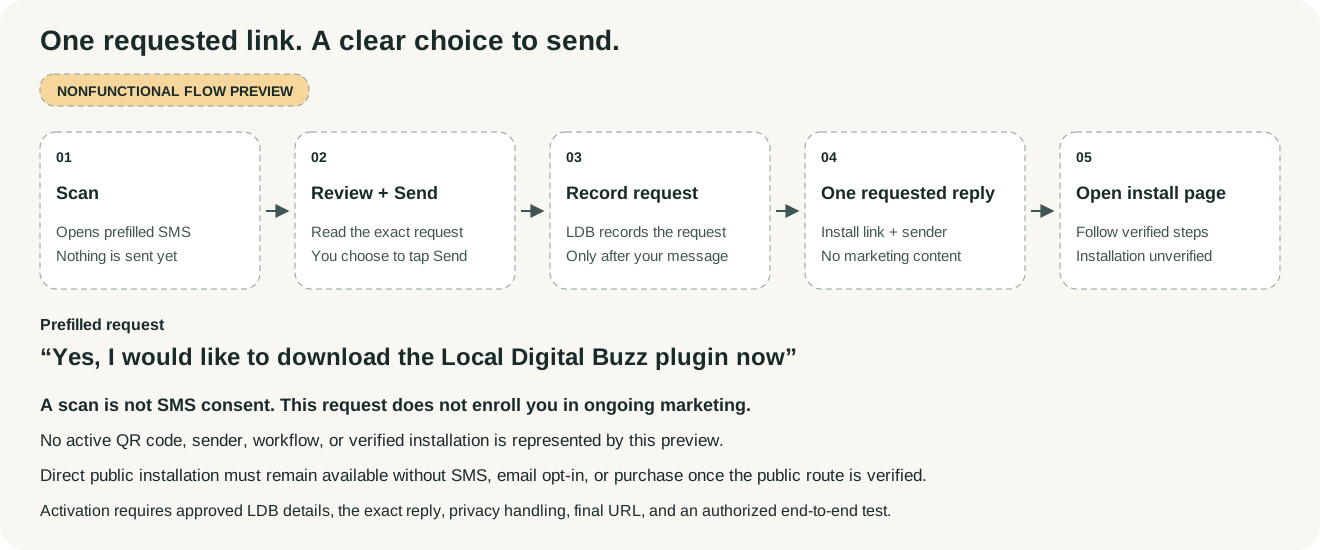
An optional way to receive the future installation link. This flow is a nonfunctional preview.

Preview the optional QR-to-SMS flow

QR-to-SMS request flow · Nonfunctional preview

The direct public installation link will be available on this page without an SMS request, email opt-in, or purchase. The QR/SMS option offers an alternative way to receive it.

Planned flow: scan the QR code, review the prefilled request, and choose whether to tap Send. If you send it, LDB records the request in its CRM and returns one reply containing the verified installation link and sender identity. The request does not install the plugin or enroll you in ongoing marketing.

The requested reply contains only that information, with no paid offer, advertising, nurture enrollment, or marketing-consent request. No CRM record or message is created merely from scanning. This flow is not active.

Prefilled request: “Yes, I would like to download the Local Digital Buzz plugin now”

Scanning opens a prefilled text. Nothing is sent until you tap Send. Sending requests one reply from Local Digital Buzz containing the installation link. The proposed flow records the sending number and request details in LDB’s CRM to fulfill and document the request. It does not enroll you in recurring or marketing texts. The privacy notice, data handling, and provider-specific disclosures must be verified before activation.

The QR code will be activated only after the approved LDB sender, request keyword, final link, exact reply, and authorized end-to-end test are verified. Until then, this page shows a nonfunctional flow preview. Any required carrier/provider disclosures and message-rate wording will be verified before activation.

Flow preview: Scan → Review prefilled request → Tap Send → Record the request in LDB’s CRM → Receive one requested link reply → Open the installation page.

A request record or delivered link does not prove installation. Installation must remain unverified unless a supported confirmation actually establishes it.

Preview of the optional QR-to-SMS request flow. It requires the person to tap Send, records the request, and returns one requested public installation link. No active QR code is shown.
CLEAR ANSWERS

Frequently asked questions

Access and getting started

How do I install it?

The standalone LDB plugin is intended to be free. Public access is not yet available, and no availability date has been announced. This page will offer a verified public ChatGPT install link when it is available. The direct link will not require an SMS request, email opt-in, or purchase. A private plugin-management link is not a public installation route. Availability can depend on your account, workspace, and the supported distribution options at release.

Has the public plugin completed runtime testing?

Public installation and runtime acceptance remain pending. The saved private v1.2.1 source build contains 21 profile definitions; that does not establish that the final public build is available or that its behavior has passed acceptance testing. The exact public version, installation path, permissions, and relevant task behavior must be verified before release.

Can I use it now just by reading this page?

You can adapt the example prompts in your current assistant. The full Local Digital Buzz profile and playbook package is available only where it has actually been installed or supplied through a supported route. This page is a guide to the intended workflow, not an installed plugin.

Is training required to get the free plugin?

No. Direct free-plugin installation will not require course enrollment, an SMS request, an email opt-in, or a purchase. Optional free plugin lessons are planned in LDB’s existing branded training center. Registration and progress, where supported, are separate. Paid coaching programs are not included merely because you use the free plugin. The training and course-dashboard links remain pending verification, and the listed lessons are outlines for now.

How do updates work?

Updates can apply automatically only where the host platform actually supports that behavior under existing permissions. Otherwise, use the version notice and verified update instructions provided for your installation. New permissions and breaking changes need the appropriate user or administrator approval. This plugin cannot inspect every user’s installed version across accounts. Periodic update reminders require your explicit consent.

How do I check whether I have the latest version?

Where the host exposes an installed version, compare it with the latest version shown on the verified public listing or release notice. Follow the host’s confirmed update steps if they differ. A verified update link will be supplied when available; this preview does not invent one or claim that every installation updates automatically. If version information is unavailable, say so rather than assuming the installation is current.

What should I say first after I have access?

Give the business, task, audience, desired outcome, and deliverable. Add approved facts, source materials, brand assets, constraints, and a deadline with time zone when relevant. You can start with incomplete information; the assistant should identify material gaps and prepare what it reasonably can.

What happens during first-use onboarding?

Parker can start with your business, goals, website, audience, and current priority. You can say whether you already use LDB or prefer the free standalone route. Existing LDB users work with their own authorized subaccount; standalone users can use their own GA4 and other tools where supported. A self-reported account label does not prove access. Connect only what the task needs, starting with read access where sufficient, and authorize publishing, messaging, or spending separately.

Should I choose a specialist or start with Parker?

Choose a specialist for a focused task. Use Parker PM for substantial work that crosses specialties or needs scope and sequencing. Use Parker Coordinator when you specifically need handoff and dependency organization under an established accountable lead. Say which Parker you mean when ownership or external actions matter.

Why do the specialists have names?

The names make different methods and working styles easier to request. They are fictional AI profiles, not claims of real employees, human experience, university degrees, professional licenses, or outside endorsements.

Does each profile become its own running agent?

The plugin supplies instructions and references for the host assistant. It does not deploy separate agents, start a server, message saved agents, or run unattended schedules. Actual delegation requires a supported, authorized route. A prepared task brief should not be reported as a dispatched assignment.

Can I use this for my business without using LDB’s HighLevel platform?

Yes, the methods can be applied to your business context in a supported host without an LDB HighLevel connection. You can prepare plans, drafts, analyses, and handoffs from supplied material. Connected account work requires whichever tools and permissions that task needs.

Is this the same thing as an LDB service subscription?

The standalone plugin is free and does not require an LDB subscription. Your chat access, connected software, and any LDB managed service are separate. Growth pricing and scope are being finalized. The proposed direction includes a defined human delivery-team handoff and live human PM alongside the AI workflow; scope, staffing, capacity, availability, and commercial terms must be confirmed before an offer is activated. Installing the plugin does not start a paid service.

Connections, handoffs, and approvals

Which accounts are already connected?

None are supplied by the plugin package. It includes no agency account access, client list, CRM location, bank connection, or credentials. The assistant must inspect the connections and supported actions available in your session before describing what it can actually do.

How much access should I connect?

Start with the least access needed for the task, often read-only. Verify the correct business and client account before use. Posting, publishing, sending, spending, and other changes require their applicable authority in addition to access. Use secure connection flows, keep client data separate, and revoke access through the host or service controls when no longer needed. Never paste passwords or API keys into ordinary chat.

What if I connect Google Drive? Does that include Ads or GA4?

A Drive connection does not establish access to Google Ads, GA4, GTM, Search Console, or Business Profile. Each relevant product, resource, and action needs verification. If access is missing, the assistant can still prepare a specification or checklist from the material you provide.

How do specialist handoffs work?

A useful handoff records the goal, inputs, deliverable, scope, account or destination, deadline, acceptance criteria, current authority, and next owner. When real delegation is available and authorized, the assistant should verify dispatch and inspect the returned work. Otherwise, it can apply relevant methods in the same conversation or prepare a brief for you to relay.

What requires my approval?

Your request, valid standing permissions, connected service rules, and the host’s safeguards determine the approval needed. Sending messages, publishing, spending money, activating campaigns, changing access, making contractual commitments, and other consequential actions need the applicable authority. Some actions require confirmation at the time or must be completed by you. Preparing content does not authorize releasing it.

Will it send, schedule, or publish automatically?

Only when a real supported capability exists and the specific operation is authorized. A content calendar is a plan; a workflow document is a specification. Saved, scheduled, sent, published, and verified should be reported as separate states with evidence. Ongoing operation requires a separately configured and authorized runtime or schedule.

What happens when a connection or approval is missing?

The assistant should name the precise blocker and the smallest next step. It can continue independent authorized work, such as drafts, calculations, assets, or test plans. It should not bypass denied access or describe the blocked action as complete.

Privacy, clients, and professional review

What should I share, and what should stay out of chat?

Share only the information needed for the task and that you are authorized to provide. Use the host’s or service’s secure connection flow for credentials. Do not paste passwords, API secrets, raw payment details, or other sensitive identifiers into ordinary prompts. Review the host and connected service’s current privacy terms and controls before supplying client or sensitive material.

Does “client mode” keep client data technically isolated?

A business or client label helps the assistant apply the right context. Technical isolation depends on the actual workspace, account permissions, storage, and connected systems. Use distinct client records and verified resources. Reuse clean methods without copying another client’s data, prior approvals, credentials, or private results into a new project.

Can it certify that my marketing is legally compliant?

No. Alexandria supports legal and compliance research and preparation. Nadia reviews security, privacy, and governance risks. Neither is an attorney or licensed professional. Alexandria reviews LDB exposure first, then the client or project, and prepares research or drafts using read-only Google Drive, Docs, Sheets, and Slides access. She does not implement legal or tax actions, send external legal communications, or authorize release. An internal recommendation to proceed to human release is not legal clearance or release approval. Material legal questions, jurisdiction-specific interpretations, regulated advice, and final legal sign-offs belong with appropriately qualified humans; consequential tax matters require a CPA or tax counsel.

Can Margaret replace my accountant or adviser?

Margaret can help organize records, analyze figures, build forecasts, and prepare questions or documentation for professional review. The profile is not a CPA, investment adviser, attorney, fiduciary, or company officer. Financial actions and regulated decisions remain subject to your authority, platform controls, and appropriate professional involvement.

Costs, quality, and troubleshooting

What does it cost?

The standalone plugin is intended to be free. A compatible host may have its own plan requirements and usage costs. Connected software, LDB services, media generation, ad spend, email/SMS, hosting, and other third-party charges may be separate. Growth pricing, scope, staffing, capacity, and commercial terms remain pending; no purchase or enrollment is available from this preview. Any platform trial, its duration, initial charge, recurring terms, and cancellation details still need confirmation. Confirm the actual total and terms before approving paid work.

Does Growth give me unlimited work or replace my staff?

The proposed Growth direction would add a defined human delivery-team handoff and live human PM alongside the AI workflow, subject to verified staffing and service scope. The agreed scope, delivery capacity, review duties, response expectations, and additional charges must be confirmed before purchase. No unlimited-work allowance or all-human-staff replacement is promised.

How does the QR-to-SMS plugin request work?

The optional QR opens the prefilled text “Yes, I would like to download the Local Digital Buzz plugin now” in your messaging app. You review it and tap Send yourself. The proposed workflow records a sent request in LDB’s CRM and returns one requested message from the approved LDB sender with the verified plugin link and sender identity. The reply contains no advertising, paid offer, nurture enrollment, or marketing-consent request. The flow is currently inactive. A scan alone is not consent, and this request does not authorize ongoing marketing. A separate optional opt-in is needed for future marketing. Requested and delivered links are distinct from a verified installation. The flow remains a preview until the sender, keyword, reply, link, privacy handling, and authorized test are verified. You will also be able to use the direct public installation link without the SMS flow.

Will it remember my business or keep working after I leave?

That depends on the host and any explicitly configured storage, memory, or automation. The plugin itself does not guarantee cross-chat memory, background activity, reminders, or monitoring. Save approved briefs and outputs in an authorized destination and reuse them when needed.

Can I request a weekly business or KPI brief?

Yes, where the host supports the needed data and scheduling. First agree the business questions, KPI definitions, baseline dates, data sources, cadence, time zone, and delivery channel, and explicitly authorize the recurring brief. The assistant must verify that the schedule is actually configured. Installing the plugin does not start recurring work. Reports should identify missing or stale data, distinguish unknowns from zero, and avoid claiming more certainty than the evidence supports.

Will the plugin suggest paid LDB upgrades?

The saved v1.2.1 instructions prohibit unsolicited paid-service suggestions or reminders, promotional usage cadences, counters, and exposure-state tracking. Factual existing-account, entitlement, and support questions can be answered neutrally using authorized evidence and current official support information, without paid-upgrade promotion, transaction links, or indirect upsell routes. This draft’s external website service section remains separately reviewed and must not be used as an in-plugin upsell destination. The saved source was read back and matched the corrected candidate. Runtime behavior and installed-client adoption still require separate verification.

What if a specialist gives a generic or incorrect answer?

Point to the exact issue, provide the authoritative source, and ask for a revision against explicit acceptance criteria. Ask it to separate facts, assumptions, estimates, and unknowns. For important work, check sources and the final artifact, and involve the appropriate human reviewer. Confident phrasing is not evidence.

What if the assistant claims it sent or changed something?

Ask for the source-system confirmation, exact affected item, and relevant behavior check. If the outcome is uncertain, inspect current state before retrying so a message, campaign, charge, or other action is not duplicated. A tool name, screenshot, or successful save alone may not establish the full customer journey worked.

How is quality checked?

Define acceptance before substantial work. Tie each important requirement to the exact artifact version, a meaningful check, observed evidence, and any remaining gap. Check names, amounts, dates, claims, rights, destinations, and relevant failure paths. When independent review is needed, use a genuinely separate reviewer or process.

Does it guarantee more leads, revenue, rankings, or conversions?

No. It helps prepare and evaluate work using defined goals and evidence. Business outcomes depend on your offer, market, execution, spend, capacity, customer response, and many other factors. Forecasts and test hypotheses should remain clearly labeled, and attribution should not be confused with proof of cause.

Can I export the work or give it to my own team?

Ask for the format your team needs, such as a document, spreadsheet, creative brief, source files, or a structured handoff. Available formats and downloads depend on the host and tools. Check rights, recipients, and permissions before sharing. Deliverables should include the relevant version, assumptions, remaining gaps, and next owner.

How do I know a project is finished?

Compare the result with the agreed acceptance criteria. Look for the correct final artifact, evidence of any applied or released change, relevant behavior checks, the authorized acceptance decision, and ownership of remaining items. A useful finish can also be a complete review package awaiting your decision.

LOCAL DIGITAL BUZZ

Give the next task a clearer path

Start with a real outcome. Choose one specialist or bring the moving parts together with Parker PM. Keep the evidence, decisions, and next steps visible.

Public plugin access is not yet available · Availability date not announced

Local Digital Buzz specialist profiles are fictional AI personas. The plugin provides reusable methods and instructions. External execution depends on available tools, correct access, and authorization. Professional review is required where applicable. No specific business outcome is guaranteed.

PLUGIN PRIVACY

Local Digital Buzz plugin privacy

Local Digital Buzz is operated by LOCAL DIGITAL BUZZ LLC. This skills-only plugin provides written AI specialist methods and workflow instructions. Its current package contains no Local Digital Buzz MCP server, app connection, payment endpoint, analytics implementation or separate storage backend. Installation does not itself connect an LDB account, create a recurring job or enroll you in marketing messages.

Your conversations and files are handled by the host where you use the plugin, under that host's privacy policy, account settings and retention controls. If you authorize another connected service, that service's permissions and policies also apply. Check the business/account and scope before granting access. The plugin's written role labels do not technically isolate clients or alter access controls.

The package does not include an LDB-operated endpoint that automatically receives plugin conversations. This package description does not make a claim about separate host or connected-service data practices. If you contact LDB or authorize a support handoff, send only the information needed for your request. Do not send passwords, tokens, payment-card details, government identifiers or unrelated personal/client information.

LDB's existing privacy notice explains its website inquiry, chat and SMS practices, provider categories and request routes: https://localdigitalbuzz.com/privacy/. Its website-measurement retention limits should not be read as promises about host conversations, connected-service files or every support record. Privacy questions and requests about information held by LDB can be sent to its publicly listed address, hello@localdigitalbuzz.com. For data held by a host or connected provider, use that provider's verified controls or support route. Revoking access and deleting an already exported file are separate actions.

Using the plugin does not enroll you in promotional SMS. A separately requested plugin-link reply is not consent to continuing marketing.

PLUGIN SUPPORT

Help with the Local Digital Buzz plugin

For plugin help, email support@localdigitalbuzz.com. Include the version if available, the host, the task you were attempting and a brief description of the problem. Remove credentials and unrelated personal/client details from examples. LDB handles these inquiries through its existing inquiry process described in its privacy notice. No response-time guarantee is stated here.

The plugin provides fictional AI specialist methods. It does not grant access to paid LDB services or other accounts. Some tasks need a host plan or separately authorized connection; where practical, you can continue with an export or a draft.